Daily Challenge
See today's LeetCode Daily Challenge together with its difficulty and topic tags.
Recap is a free, open-source Chrome extension that reminds you to solve the LeetCode Daily Challenge, shows your completion status, and helps you keep your coding streak going.
Free · Open source · Chrome extension
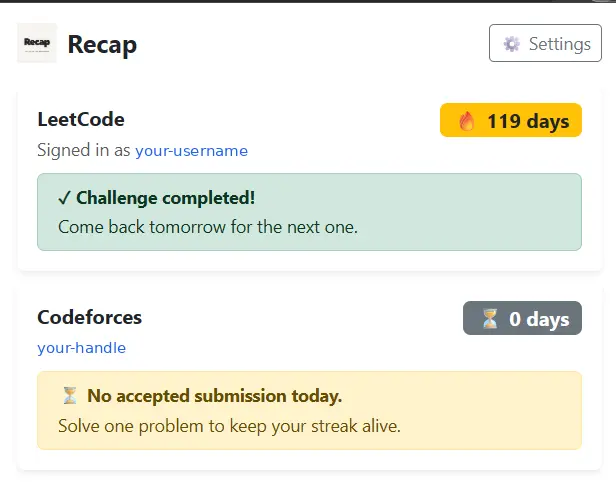
A simple Chrome extension for LeetCode users who want to stay consistent with daily problem solving.
Recap checks the LeetCode Daily Challenge and reminds you when it is time to solve it. The extension shows the challenge's difficulty, topics, completion status and streak from your browser toolbar.
Recap keeps the Daily Challenge visible without adding unnecessary complexity.
See today's LeetCode Daily Challenge together with its difficulty and topic tags.
Quickly see whether you have completed today's challenge.
Get Chrome notifications at the reminder time you choose.
Choose 15, 30, 60 or 120 minute retry intervals until the challenge is solved.
Keep track of your LeetCode streak and stay motivated to solve problems consistently.
Add your Codeforces handle in settings to track your Codeforces streak as well.
Set it up once and let Recap handle the reminders.
Download the release and load the extension through Chrome's extensions page.
Choose your reminder time, notifications and retry interval in settings.
Recap reminds you about the Daily Challenge and shows your completion status.
For technical details, see the Recap architecture documentation .
Quick answers about the Recap Chrome extension.
Recap reminds you to solve the LeetCode Daily Challenge and shows the challenge's completion status, difficulty, topics and streak.
Yes. Recap uses Chrome notifications at your chosen time and can retry reminders until the Daily Challenge is completed.
Yes. You must be signed in to LeetCode in Chrome to see your challenge status and streak.
Yes. Add your Codeforces handle in Recap's settings to see your Codeforces streak.
Yes. Recap is free and open source. The source code is available on GitHub .
Download Recap and follow the installation guide to install it using Chrome's Load unpacked option.
Recap is an open-source project developed and maintained on GitHub. You can inspect the source code, report issues and contribute to the project.
View Recap on GitHub →Download Recap and start getting reminders for the LeetCode Daily Challenge.
Download Recap